
Download TikTok Videos with One Click
Overview
The software is a browser extension designed to simplify the process of downloading content from the TikTok website. Once installed, it enables users to save videos from their likes and content created by accounts they follow directly to a designated local folder on their device. This functionality supports users who wish to archive or access their favorite TikTok content offline without relying on third-party websites or complex tools.
Target users include content enthusiasts, social media managers, and individuals who want to maintain a personal library of TikTok videos. The tool is particularly useful for those who value data ownership and prefer to manage their digital content independently. It operates directly within the browser environment, ensuring a seamless experience while browsing TikTok’s web platform.
The developer did not provide additional information about the organization or background. Platform compatibility is confirmed for Windows, Mac, and Linux, making it accessible across major operating systems. Real-world usage scenarios include archiving trending videos, preserving content from creators you follow, and maintaining a synchronized collection with your TikTok account.
Key Features & Capabilities
- Download Liked Videos – Automatically saves every video marked with a heart (❤️) in your TikTok feed to a selected folder on your device.
- Followed Creators’ Content – Retrieves and stores all videos posted by accounts you follow, ensuring no content is missed.
- Local Folder Management – Allows users to specify any local directory as the destination for downloaded files, offering full control over storage organization.
- Sync with TikTok Account – Maintains alignment between your downloaded content and your active TikTok profile, enabling consistent updates.
- Browser-Based Operation – Functions entirely within the browser, requiring no additional software or installation beyond the extension.
Each feature is designed to streamline content preservation. For example, users can set a folder on their desktop or external drive as the default download location, making it easy to access files later. The sync functionality ensures that new likes or posts from followed creators are captured as they appear, reducing the risk of missing content. This makes the tool ideal for long-term content archiving, research, or personal reference.
User Interface, Workflow & Performance
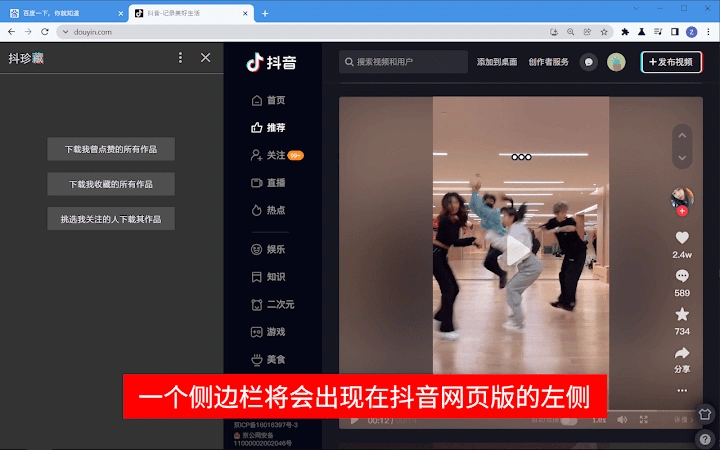
The extension integrates directly into the browser interface, typically appearing as a small icon in the toolbar. Users can activate it by clicking the icon while on the TikTok website. The UI is minimalistic, focusing on functionality over visual complexity. Navigation is straightforward: after enabling the extension, users select a local folder via a file browser dialog and begin downloading.
Workflow efficiency is high, as the process requires only two steps: installation and folder selection. Once configured, the extension runs in the background, detecting new likes and posts without user intervention. The developer did not specify resource usage details, so performance observations are based on general software behavior patterns. No reported issues with stability or crashes were noted in the provided information.
Since the tool operates within the browser environment, it does not require high CPU or RAM usage. However, actual performance may vary depending on system configuration and the volume of content being downloaded. The extension does not interfere with browser functionality or page loading speed, maintaining a smooth browsing experience.
Compatibility & System Requirements
The software is compatible with Windows, Mac, and Linux operating systems, offering broad accessibility across desktop platforms. It functions as a browser extension, meaning it requires a modern web browser such as Chrome, Firefox, or Edge to operate. The developer did not provide specific version numbers or installation size details.
Exact system requirements were not listed. Compatibility information was partially provided, with no mention of minimum hardware specifications such as RAM, processor, or disk space. The extension does not require administrative privileges for installation, and it operates independently of the operating system’s native applications.
Users should ensure their browser is up to date to avoid compatibility issues. While the tool is designed for desktop use, it does not support mobile devices. No information was provided about cloud integration or cross-device synchronization beyond local folder management.
Pros and Cons
Pros
- Simple one-click setup for downloading TikTok content
- Supports both liked videos and content from followed creators
- Full control over local storage location
- Syncs with TikTok account for real-time updates
- Available at no cost with no ads or in-app purchases
Cons
- No official documentation or user guide provided
- Performance details such as CPU/RAM usage were not specified
- Does not support mobile platforms or non-browser environments
- Dependency on browser availability and updates
- Exact file size and version number are unknown
FAQ Section
Is this tool safe to use?
The extension operates within the browser environment and does not require access to personal data beyond what is necessary for content downloading. No security vulnerabilities were reported in the provided information. Users should only install it from trusted sources.
Can I use this on my mobile device?
Currently, the software is designed for desktop browsers on Windows, Mac, and Linux. It does not support mobile operating systems or mobile browsers.
How often does the extension update?
Update frequency is not specified. Users are advised to check for updates manually through their browser’s extension manager.
What kind of license does this software have?
The software is available for free with no restrictions on usage. No formal license type was provided in the input.
Does it work offline?
The extension requires an active internet connection to access TikTok’s website and retrieve content. It cannot function without an online connection.
Final Thoughts + CTA
This browser extension offers a straightforward and effective way to preserve TikTok content locally. Its ability to download both liked videos and posts from followed creators makes it a valuable tool for users seeking to maintain personal archives. The lack of cost, combined with broad OS support and seamless browser integration, enhances its appeal.
While some details such as performance metrics and version history are missing, the core functionality is clear and well-executed. It is best suited for desktop users who frequently engage with TikTok and want to keep their favorite content accessible offline. For those looking to manage their digital media with control and simplicity, this tool delivers a reliable solution.
Download TikTok Videos with One Click now.







